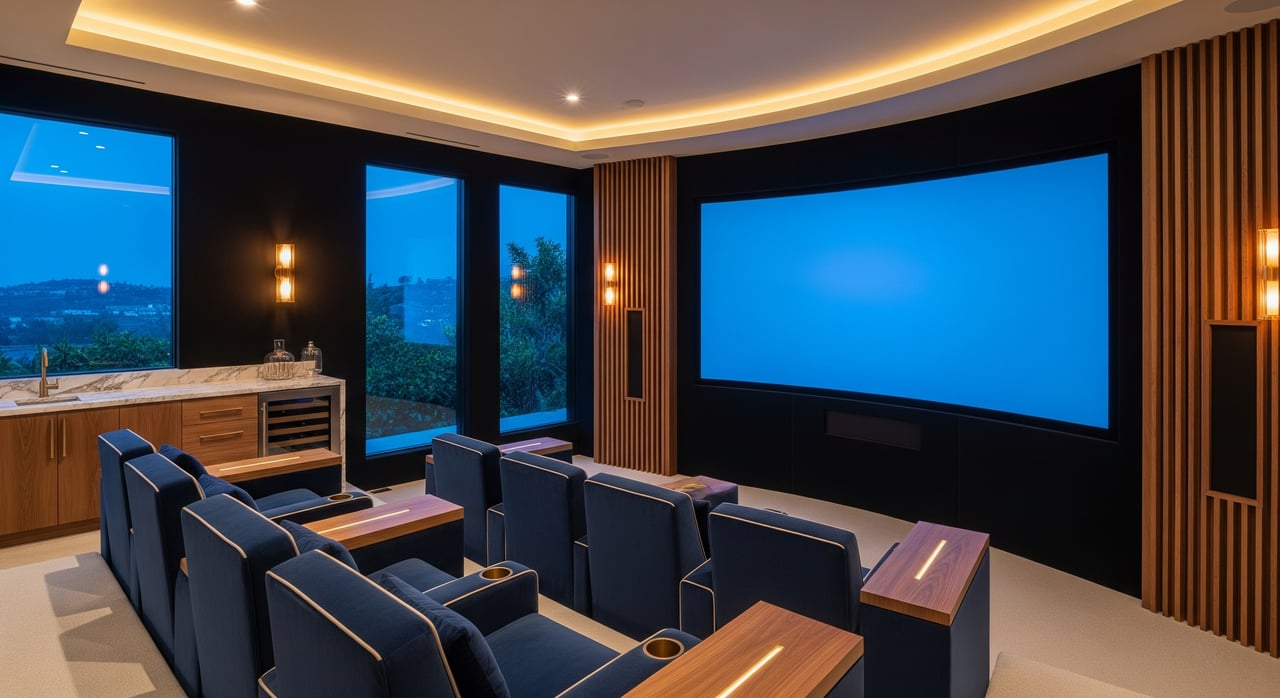
What if your next Regal Yorba Linda & IMAX night inspired a media room at home that feels just as immersive? You want comfort, control, and a big-screen experience without leaving Yorba Linda. With a smart plan, you can design a flexible media room that elevates everyday streaming and makes movie nights feel special.
Below, you’ll learn how to choose the right room, balance acoustics and lighting, pick screen and audio setups, and plan practical steps for permits and installation in Yorba Linda. You’ll also get staging ideas sellers can use to wow buyers. Let’s dive in.
Why a media room in Yorba Linda
If you love heading to Regal Yorba Linda & IMAX, a well-designed media room can bring that energy home between outings. You get the convenience of your own schedule, cozy seating, and the ability to host friends for premieres and sports. You can always check current listings and times through Regal Cinemas’ showtimes and theater information when you want the full night out.
Yorba Linda buyers often look for clean, light interiors and multipurpose spaces. A media room that doubles as a family lounge, play space, or guest room boosts everyday value and future resale appeal. In our sunny climate, you also want cooling and airflow that keep equipment and people comfortable during long viewings.
Plan your space: the four essentials
Acoustics: clear sound, happy household
Great sound starts with the room. Interior rooms with fewer windows help reduce sound leakage. If you are converting a garage or a room with exterior walls, add insulation and seal gaps to contain sound.
Inside the room, control early reflections with acoustic panels on the side walls and ceiling near the speakers. Add bass traps in corners to smooth out low frequencies. Aim for a balanced sound that keeps dialogue crisp without making the room feel overly dead. For deeper best practices, explore industry guidance from CEDIA on home theater design and acoustics.
If you live in an attached home or have an HOA, review community guidelines before you start. A licensed contractor can advise on sound isolation options like resilient channels, extra drywall layers, and acoustic sealants.
Screen and audio: big, bright, immersive
Choose your display based on light control and how you use the room.
- TVs: A 65 to 85 inch 4K OLED or LCD is an easy, low-maintenance choice for bright family rooms. HDR content looks vivid and sharp.
- Projectors: In a darkened, dedicated space, a 4K projector with a fixed screen creates a theater feel. If you cannot fully black out the space, consider an ambient-light rejecting screen to protect image contrast.
Audio is where immersion comes alive. A 5.1 surround setup fits most rooms. Larger spaces can step up to 7.1. If you want a more cinematic feel, add height channels with Dolby Atmos, such as 5.1.2. Many streaming services support object-based formats, and Dolby’s overview of Atmos explains how height effects expand the sound field.
To echo the sense of scale you enjoy at IMAX, pair a large screen with carefully planned speaker placement and ceiling height that supports overhead channels. While home layouts vary, the goal is the same: wide, enveloping sound that pulls you into the story. For context on big-screen immersion outside the home, you can explore IMAX’s overview of the immersive experience.
Seating and sightlines
Place the primary seats centered on the screen with a clear, unobstructed view. If you plan multiple rows, raise the back row to keep sightlines clean. In multipurpose rooms, modular sectionals or theater-style recliners can shift between movie night and everyday lounging.
Size seating for how you live. Four to eight seats often fits most Yorba Linda households who host guests. Keep pathways clear and consider a slim console table behind a sectional to anchor the layout without blocking views.
Lighting and control
Create three light zones: soft light for the audience, dimmable task light near the screen for setup or pausing, and bright light for cleanup. Use dimmers or smart presets so you can switch between “movie,” “intermission,” and “cleaning” modes.
Manage windows with blackout curtains, motorized shades, or room-darkening blinds. In bright afternoon light, these do more than help the picture. They also boost contrast and comfort. Keep fixtures low glare to avoid reflections on the screen.
Plan for cooling. Equipment creates heat, and quiet airflow is key. If possible, consider HVAC zoning or ducting that keeps the room comfortable without running the whole system hard. Quiet ventilation helps maintain a low noise floor so you hear more detail.
Good, better, best: project tiers
Every home and budget is different. Use these tiers as a starting point and get local quotes from experienced installers.
Entry media room
- 65 to 75 inch 4K TV or basic 4K projector and screen
- 5.1 soundbar with sub or a modest 5.1 speaker package
- Room-darkening shades and flexible seating
- Best for streaming, family movie nights, and sports
Mid-range conversion
- 85 inch TV or 4K projector with a fixed or ALR screen
- Discrete 5.1 or 7.1 speakers with an AV receiver that supports Atmos
- Strategic acoustic panels and motorized shades
- Theater recliners or a sectional configured for clean sightlines
High-end cinephile
- High-lumen 4K laser projector and a large fixed screen, or a premium 83 inch+ OLED
- Dolby Atmos 7.1.4 or similar with professional calibration
- Tiered seating, advanced room automation, and refined acoustic treatments
- A design-first space that feels like an at-home event
For product compatibility, look for HDR support across your devices. For installation quality, prioritize teams who design around room acoustics and plan wiring paths before walls are closed. To learn more about industry standards and find vetted pros, review resources from CEDIA.
Smart steps to get it done
Define use, then set the plan
Decide if this is a dedicated theater or a flexible room. List your must-haves: number of seats, how dark the room gets, and whether you want Atmos. This guides screen size, speaker layout, and lighting.
Map wiring and power early
Before finishing walls, run speaker wire, conduit for future upgrades, and power to the projector or TV location. Prewire for ceiling speakers if you are considering Atmos. Label everything so service is easy.
Manage heat and noise
Cluster gear in a ventilated cabinet or closet to keep fan noise away from seats. Add quiet ducting or whisper fans. Confirm airflow and plan cable paths so you can upgrade hardware later without opening walls.
Choose the right professionals
Interview multiple installers and ask:
- Do you have CEDIA certification or equivalent experience?
- Can we see a portfolio of similar projects?
- How will you measure the room and place speakers for Atmos?
- What is the warranty on equipment and labor?
- Do you handle calibration and follow-up tuning after installation?
Permits and HOA in Yorba Linda
Structural changes, electrical work, and HVAC modifications may require permits. The City of Yorba Linda outlines permit and inspection steps through the Building Division. If you live in an HOA community, check architectural review requirements and approved contractor lists before you begin. Always use licensed electricians and follow code-compliant low-voltage wiring practices.
For sellers: stage an IMAX-style moment
If you plan to list, a thoughtful media room can become a showpiece. Create a simple “movie” lighting scene before each showing. Set out a popcorn station and cue a short demo reel that highlights dialogue clarity, dynamic action, and colorful nature footage. Share a one-page spec sheet that lists recent upgrades, warranties, and installer contacts to give buyers confidence.
Tie the story to local lifestyle. You can position the home as a place to enjoy premieres at Regal IMAX, then host a cozy after-party at home. That helps buyers imagine how the room elevates everyday living while staying flexible for gaming, watch parties, and casual lounging.
Ready to explore upgrades that add comfort now and value later? Our team helps sellers stage media-friendly spaces that show beautifully online and in person, and we help buyers spot homes that convert easily into high-impact media rooms.
FAQs
What should Yorba Linda homeowners consider first when planning a media room?
- Start with room choice, light control, and how you will use the space. Then plan acoustics, display size, and speaker layout before finishing walls.
How does Dolby Atmos improve a home media room?
- Atmos adds height channels for overhead effects, expanding immersion beyond traditional surround. Learn more from Dolby’s overview.
Are permits required for media room projects in Yorba Linda?
- Many structural, electrical, and HVAC changes require permits. Review steps with the City’s Building Division and confirm HOA approvals if applicable.
Should I choose a large TV or a projector for my space?
- TVs excel in brighter rooms and need little upkeep. Projectors shine in dark, dedicated spaces with larger screens. Your choice depends on light control and viewing habits.
Where can I find reliable installers and guidance?
- Look for CEDIA-certified professionals and review best practices via CEDIA’s resources. Ask for portfolios, references, and details on calibration.
How do I bring a bit of the IMAX feel home?
- Pair a large screen with a well-planned surround or Atmos system, control ambient light, and use acoustic treatments. For context on the big-screen experience, visit IMAX’s site.
If you want tailored advice on which upgrades will move the needle for your sale or search in Yorba Linda, connect with the Tina Tan Group to Request Your Home Valuation.